Keep priorities visible
Show only the tasks that matter right now: due today, unassigned, overdue, or scoped to a specific collection.
Mangose
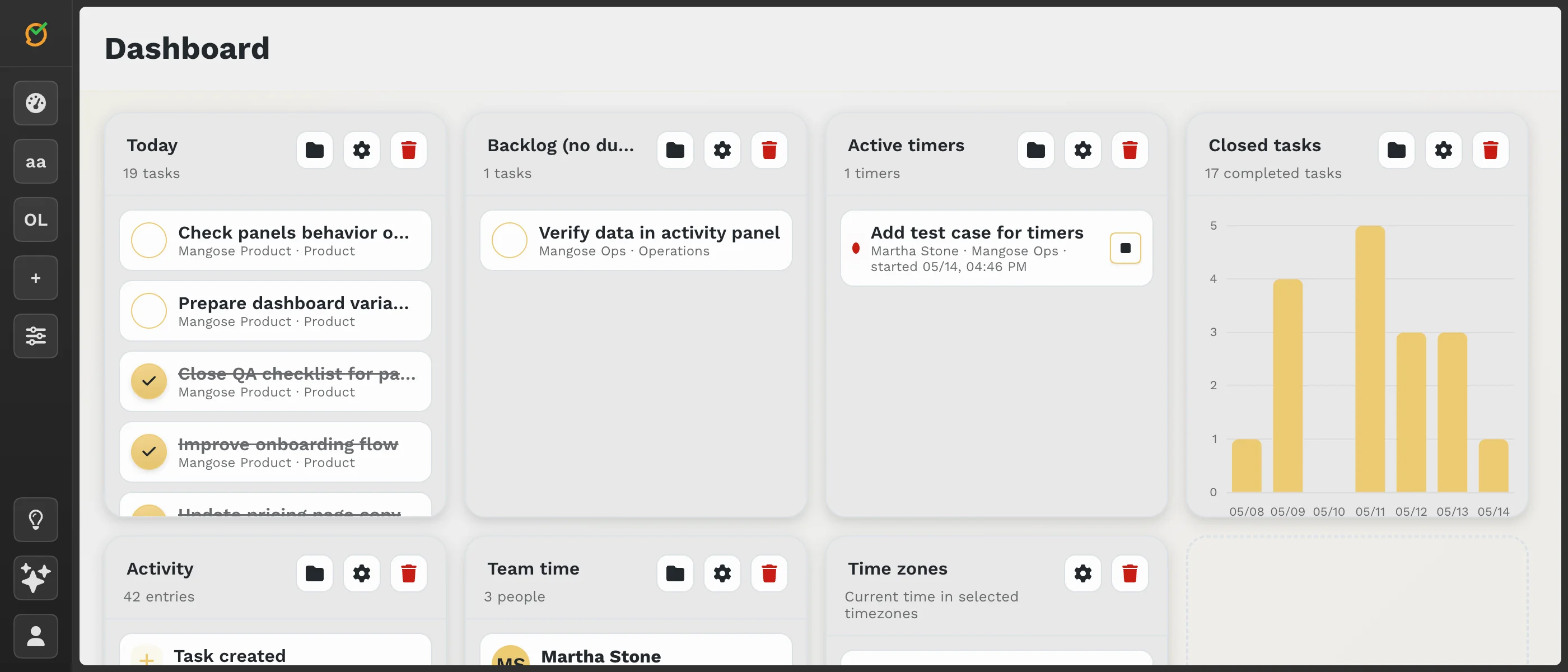
Build your own dashboard from panels for tasks, recent activity, work time, completion charts, collaborators, notes, embeds, and shared page stats. Keep the overview you need without leaving your workspace.
Custom overview
Combine task lists, recent activity, work time, completion charts, collaborators, notes, embeds, public sharing status, and time zones in one scannable workspace view.
Panels
Show only the tasks that matter right now: due today, unassigned, overdue, or scoped to a specific collection.
Surface active timers and recent time logs so effort is visible without opening each task.
Review recent task updates and comments to understand what changed while you were away.
Use completion charts to see whether tasks are moving and how much work was finished over time.
Keep useful notes, external dashboards, docs, or references next to the operational panels.
Check published workspace and collection pages, plus shared page visit trends, from the same overview.
Daily work
A dashboard can show what is due, who is working on what, where time is currently running, and which tasks were completed recently. It is a practical operating view, not a static analytics page.
Flexible setup
Teams can use dashboards for sprint follow-up, personal planning, client work, shared website monitoring, or lightweight reporting without leaving Mangose collections.
Use cases
Start with today’s due tasks, active timers, and a small note panel for the plan of the day.
Combine collaborator time, recent activity, and completion charts for a lightweight team rhythm.
Track scoped collections, embedded references, shared page status, and task progress in one place.
Explore more
Start with tasks, time, activity, and notes, then shape the overview around your daily workflow.